SS
SS
Key Takeaways
- You need two things to start: a Chromium-based browser and a TailorCV account.
- Chrome will show a permissions prompt on install - it asks to read job pages so it can pull the job description.
- Setting your base resume is the one-time step that makes everything afterwards a single click.
- Once set up, the panel opens beside any posting on LinkedIn, Indeed, Naukri, Greenhouse, Lever, Workday, Ashby, Glassdoor and more.
- Fifteen major boards are supported out of the box, and there is a fallback for company career pages nobody has built an adapter for.
Setting up the TailorCV Chrome extension takes about two minutes and two steps: install it, and tell it which resume to tailor from. After that, tailoring your resume to any job is one click on the posting itself. This guide walks through the whole thing, plus what to do if something does not work.
Before You Start
You need two things: the Google Chrome browser (or a Chromium-based browser like Edge or Brave that supports Chrome extensions), and a TailorCV account. The account is free to create, and the extension requires you to be signed in because it works from your saved base resume — there is no way to tailor a resume the tool has never seen.
If you do not have an account yet, you will make one during setup; it takes a moment. Everything the extension does — reading a job posting, scoring your match, tailoring — is tied to your account, which is also what lets it save every tailored version to your library automatically.
Step 1: Add the Extension to Chrome
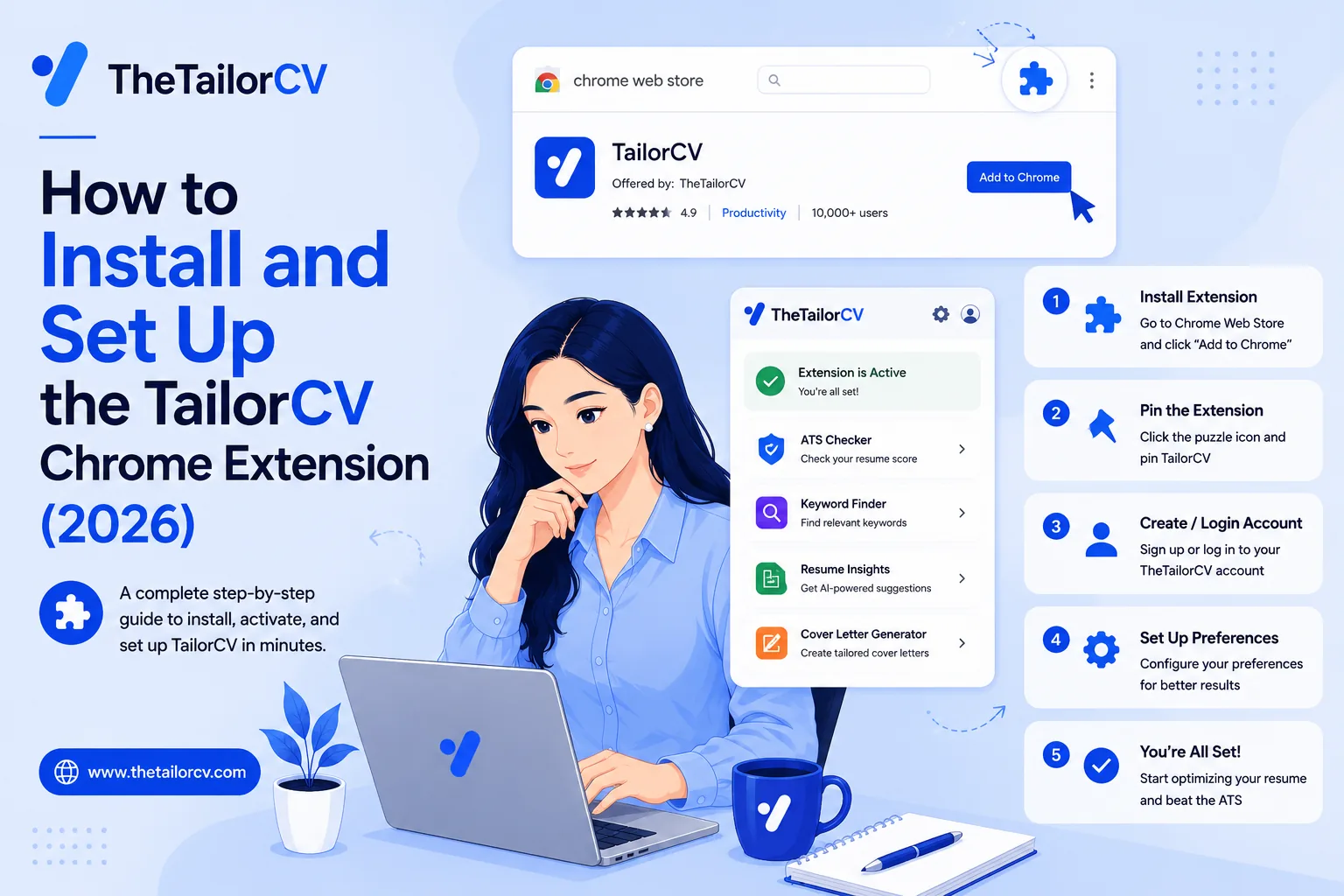
Open the TailorCV extension page and click "Add to Chrome". Chrome will show a permissions prompt — it asks to read job pages so it can pull the job description, and to access TailorCV so it can sign you in. Approve it, and the TailorCV icon appears in your toolbar.
That is the entire install. If you do not see the icon afterward, click the little puzzle-piece "Extensions" button in Chrome's toolbar and pin TailorCV so it stays visible — you will want it one click away.
A note on the permissions, since a careful person should read them: the extension reads the job page only when you open its panel on a job posting, uses that description to tailor your resume, and does not track your general browsing. We cover this fully in our guide on whether job-search extensions are safe, and it is worth understanding for any extension you install, not just ours.
Step 2: Set Your Base Resume
This is the one-time setup that makes everything else one click. Your "base resume" is the resume the extension rewrites from for every job — you upload it once, and the tool adapts it per posting rather than making you start over each time.
On the extension setup page, upload the resume you normally send as a PDF. Before you do, it is worth making sure that base is genuinely solid, because every tailored copy inherits its quality: run it through a free ATS score, confirm it is ATS-friendly and parseable, and quantify your achievements. A weak base means weak tailored copies; a strong base means every one-click tailor starts from a good place.
While you are there, you can also pick your preferred resume template and cover-letter style, so the tailored PDFs come out looking the way you want. That is it — setup done.
Step 3: Tailor Your First Job
Now the payoff. Open any job posting — LinkedIn, Indeed, Naukri, Greenhouse, Lever, Workday, Ashby, Glassdoor and more — and the panel opens beside it.
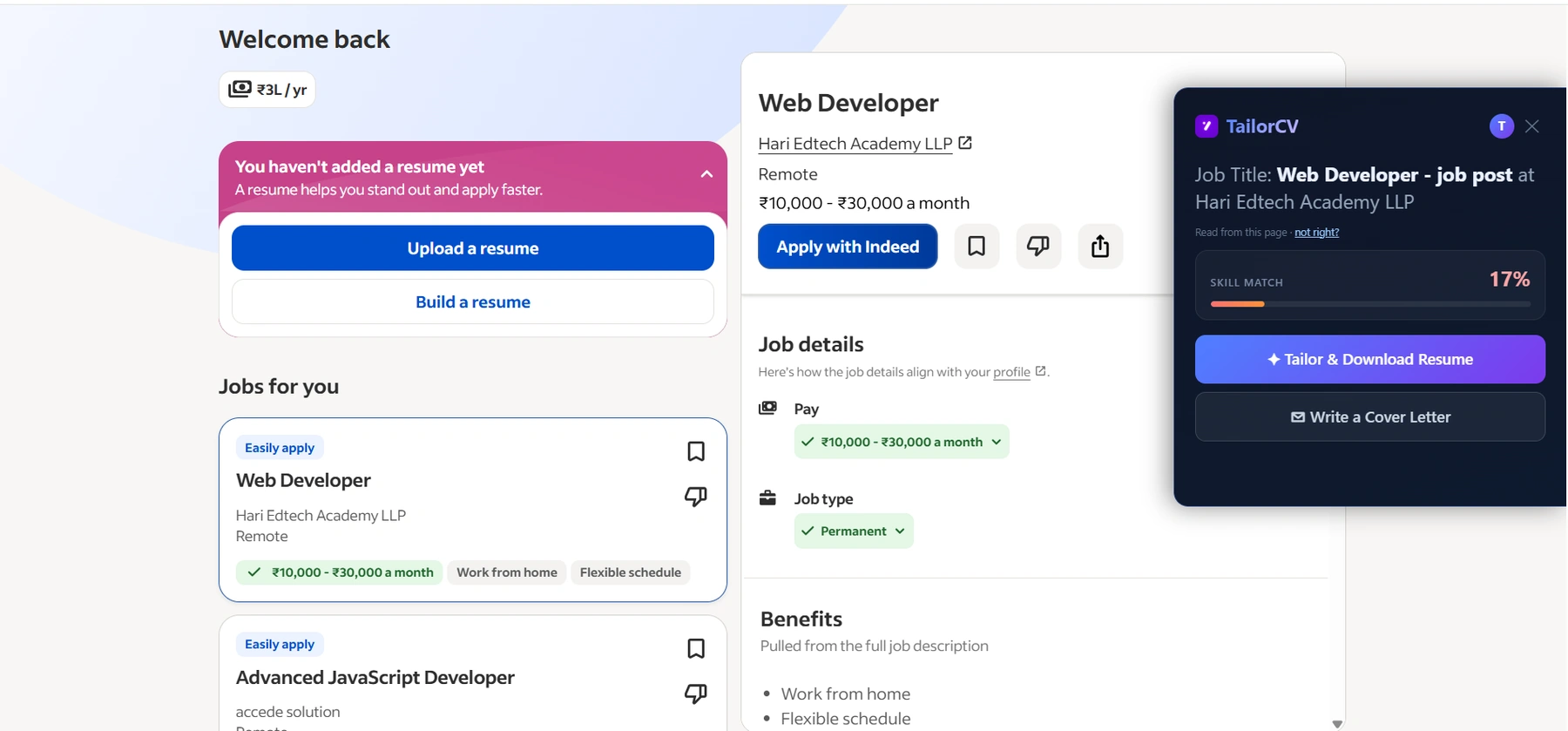
What it looks like on a LinkedIn job post
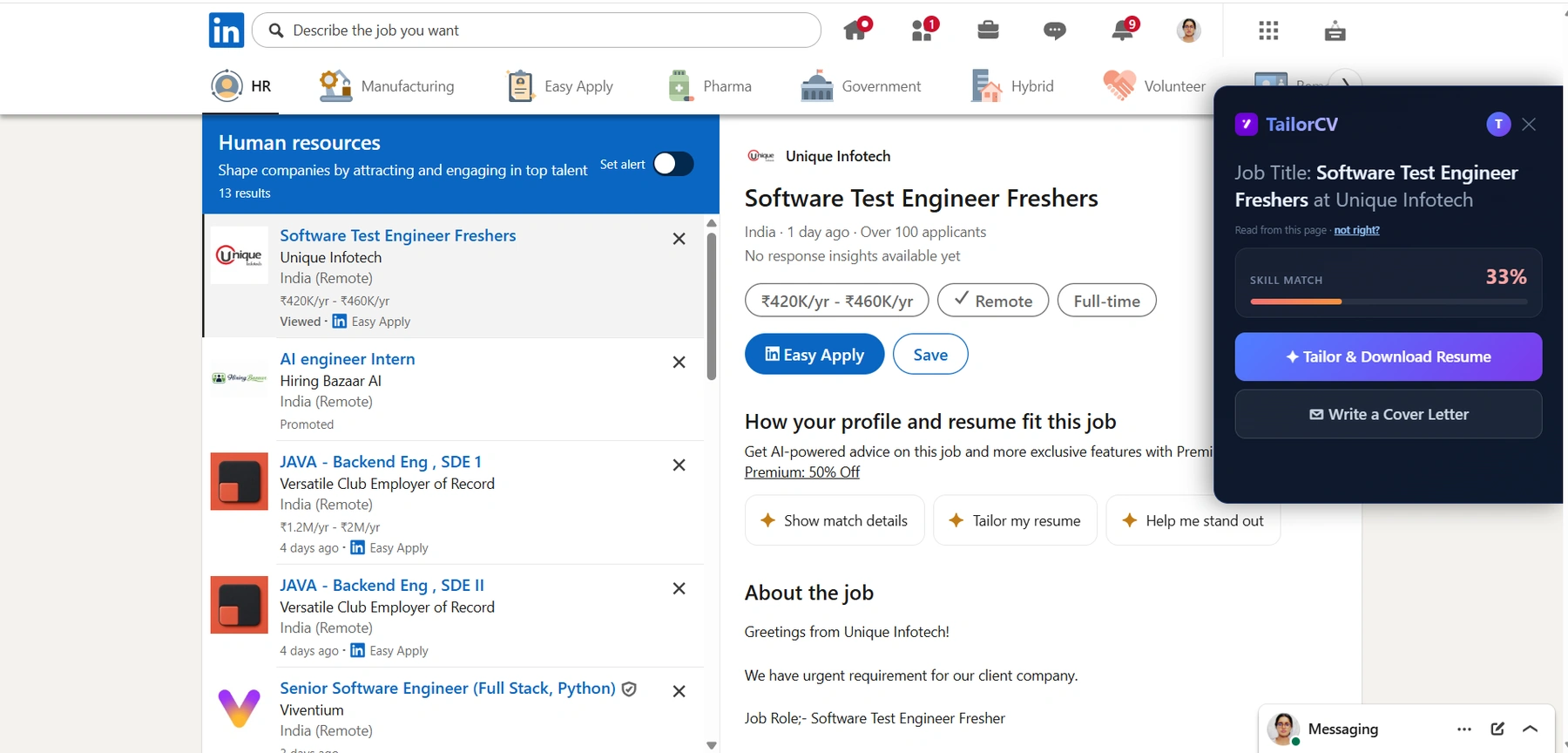
And the same on LinkedIn: the extension reads the posting off the page you are already on, so the match score arrives before you hit Easy Apply.
It reads the job description off the page and shows your skill-match score against that role. One click tailors your base resume to the posting — working in the missing keywords from your real experience, in your own voice — and downloads the tailored PDF. A second click writes a matching cover letter. Read the output, adjust anything you want, and apply. That is the whole loop, and it is about a minute start to finish.
Using It on Any Site
The extension supports fifteen major job boards out of the box, but plenty of good jobs live on company career pages nobody has built a specific adapter for. For those, click the TailorCV toolbar icon while you are on the posting, and the panel opens and reads the description anyway. So you are never stuck: declared boards work automatically, everything else works from the toolbar. This is how tailoring stays possible everywhere you apply, not just on the big aggregators.
Troubleshooting
A few common hiccups and their fixes.
The panel says "checking login" and does nothing. You are not signed in, or your session expired. Open the extension page, sign in, and reopen the panel. If you just installed it, make sure you completed the account step.
The panel did not open on a job page. On a declared board it opens automatically on postings; on other sites, click the toolbar icon. If a board changed its page layout, the toolbar-click fallback still reads the description.
"No base resume set." Go to the extension setup page and upload your base resume PDF. The extension cannot tailor from a resume it does not have.
The tailored resume looks off. Read the output before sending — that is always the final step. If a bullet reads wrong, adjust it; the tool produces a strong draft, but you keep the final judgement. It will never fabricate experience, but you should still confirm everything is true and sounds like you.
After Setup: Your Search Workflow
With the extension set up, your per-application workflow is: open the job, check the match score, tailor, read, add the cover letter, apply, move on. Then send a follow-up after applying and after the interview. Before interviews, research the company, rehearse behavioural questions and tell me about yourself, and run a mock interview; the full interview prep guide covers more.
Freshers: your ATS score as a fresher, projects that get interviews, your first tech job, a job with no experience, campus placement, a portfolio site, and the right template. And pace yourself — fewer, tailored applications beat volume.
Getting the Most Out of It After Setup
Installing is the easy part; using it well across a whole search is where the value is. A few habits make the difference.
Tailor every application, not just the important ones. The whole reason the tool exists is that one-click tailoring is fast enough to do every time. The moment you start deciding which jobs are "worth" tailoring for, you are back to the manual mindset that made you skip it — see how to tailor for every job and matching your resume fast. At one click, there is nothing to decide.
Keep your base resume current. As you gain experience, add it to the base resume so future tailored copies draw on it. A base you refresh every few weeks produces better tailored versions than one you uploaded once and forgot. If you are unsure it is still strong, re-run a free ATS score on it.
Use the match score as a filter, not just a fixer. A very low score even after tailoring is a signal you may be reaching too far for a role — useful information before you spend effort on it. The difference between an ATS score and a resume score helps you read this right.
Read every output. The tool produces a strong draft; you approve it. Glance over each tailored resume and cover letter to confirm it is true and sounds like you before you submit. This ten-second habit is what keeps the speed safe.
Pair it with the rest of your search. Tailoring gets you seen — then interview prep, company research, and a portfolio do the rest. The extension is one strong piece, not the whole search.
Frequently Asked Questions
How do I install the TailorCV Chrome extension? Open the extension page, click "Add to Chrome", approve the permissions, and pin the icon. Then sign in and upload your base resume on the setup page. The whole thing takes about two minutes.
Do I need an account to use it? Yes — the extension tailors from your saved base resume, so it needs to know who you are and which resume to adapt. The account is free to create, and it is what lets the tool save every tailored version to your library automatically.
Does it work on Indeed and Naukri, or just LinkedIn? Fifteen major boards work out of the box, including LinkedIn, Indeed, Naukri, Greenhouse, Lever, Workday, Ashby, Glassdoor and more — plus any other site by clicking the toolbar icon on the posting.
What if the panel will not load? Usually you are signed out — sign in on the extension page and reopen the panel. If you have no base resume set, upload one on the setup page. On unusual sites, open the panel from the toolbar icon rather than waiting for it to auto-open.
Putting It All Together
Setup is genuinely two minutes: add the extension to Chrome, and upload the base resume it will tailor from. After that, every job you open is one click away from a matched, ATS-ready PDF and a cover letter — on fifteen boards automatically and any site from the toolbar.
The one thing worth doing carefully is Step 2: make your base resume genuinely strong before you upload it, because every tailored copy starts from there. Get the base right once, and the extension turns tailoring from a ten-minute chore you skip into a one-click default you keep.
Install it, set your base resume, and tailor your first real job — check the match score, tailor, read, apply. Two minutes of setup for a habit that changes your whole search.
Check your match before you install anything
Same score the extension shows on a job page - run it here on any resume and job description.
Drop your resume here or choose a file
PDF only. Max 2 MB.
We never share your data or use it to train AI models.

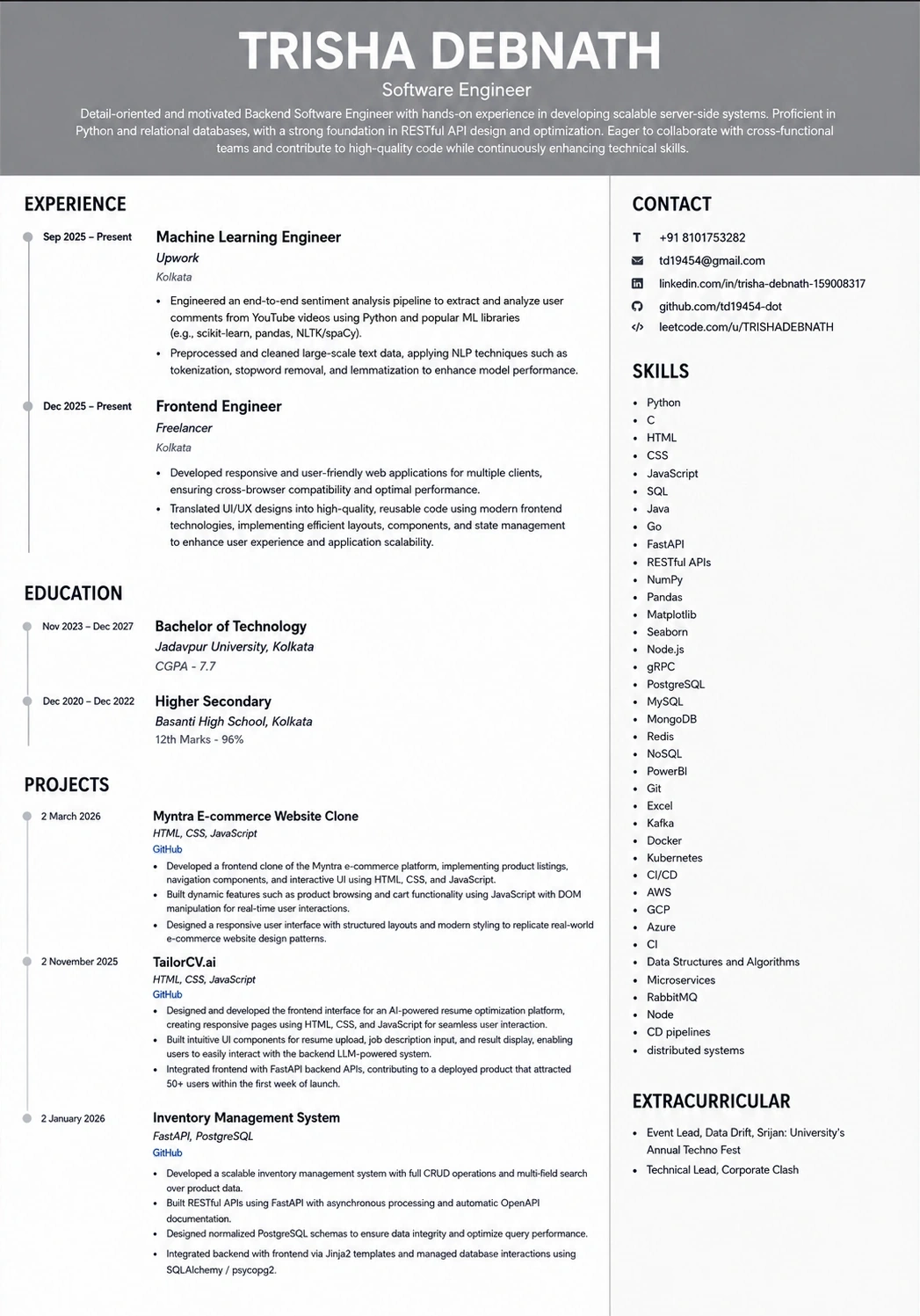
What the tailored resume looks like
This is the format the extension exports to — ATS-tested, so the match score you saw survives the parser.
Was this guide useful?
Be the first to rate it.