TD
TD

Key Takeaways
- A custom domain enhances credibility, memorability, and longevity for your portfolio.
- Choose a domain that is your name, short, easy to spell, and preferably a
.com. - Use reputable registrars for domain purchase and expect to pay around $10-15/year.
- Follow a straightforward process to connect your custom domain to your portfolio, including DNS settings and SSL confirmation.
- Avoid common mistakes like not linking your domain or forgetting to update your resume and online profiles.
yourname.com reads very differently on a resume than a long, generic subdomain. A custom domain is one of the cheapest, highest-leverage upgrades you can make to a portfolio, and it takes under an hour to set up. Pair this with How to Build a Professional Portfolio and Portfolio Domain Name Guide.
Why It Matters
| Reason | What it gets you |
|---|---|
| Credibility | a custom domain reads as more established than a free subdomain |
| Memorability | yourname.com is easier for a recruiter to type from memory or a printed resume than a long generated URL |
| Longevity | your domain stays yours even if you switch which platform or builder hosts the site behind it |
| Email matching | you can pair it with a matching professional email address later if you choose |
Choosing Your Domain
- Use your name if it is available -
firstlastname.comis the safest, most professional choice - Keep it short and easy to spell over the phone - avoid hyphens, numbers, or uncommon spellings
- Prefer
.comwhere available;.dev,.me, or.ioare acceptable alternatives for tech roles specifically - Buy from a reputable registrar (Namecheap, Google Domains successor, Cloudflare) - expect to pay roughly $10-15/year for a standard
.com
Connecting a Custom Domain to Your Portfolio
The TailorCV portfolio builder supports one-click deployment to Netlify, which makes custom domain setup straightforward:
- Publish your portfolio through the builder to get your live, shareable link
- Deploy to Netlify using the one-click option in your portfolio settings
- Add your custom domain in the Netlify domain settings and follow the DNS instructions (usually a CNAME or A record at your registrar)
- Wait for DNS propagation - typically minutes to a few hours, occasionally up to 24-48 hours
- Confirm HTTPS is active - Netlify provisions a free SSL certificate automatically once DNS resolves correctly
Common Mistakes
- Buying a domain and never connecting it, leaving your resume linking to a placeholder page
- Choosing a cute or clever domain that is hard to spell or remember under pressure
- Forgetting to update the link on your resume, LinkedIn, and email signature after switching domains
- Letting the domain lapse after a year because auto-renewal was not enabled - see Portfolio Checklist Before Applying
Pro Tips
- Set a calendar reminder a month before your domain renews, even with auto-renewal enabled, in case a payment method expires
- If your exact name is taken, try a middle initial, a hyphen, or adding your profession (
janedoedesign.com) rather than an unrelated domain - Keep the free
thetailorcv.comportfolio link as a backup while your custom domain's DNS is propagating, so you are never without a working link
Step-by-Step Guide to Setting Up Your Custom Domain
-
Select Your Domain Name: Choose a domain name that reflects your personal brand or the nature of your work. Use a name generator if you’re stuck. Aim for a name that is short, memorable, and easy to spell.
-
Register Your Domain: Use a reputable registrar like GoDaddy or Namecheap. Follow their prompts to complete the registration process. Make sure to purchase domain privacy protection if you want to keep your personal information private.
-
Choose a Hosting Provider: If your portfolio platform doesn’t include hosting, select a hosting service like Bluehost or SiteGround. Ensure they offer easy integration with your portfolio platform.
-
Link Your Domain to Your Hosting Provider: - Log into your domain registrar’s account. - Find the DNS settings and replace the nameservers with those provided by your hosting provider. - Save changes, which may take up to 48 hours to propagate.
-
Set Up Your Portfolio Platform: If you're using a platform like WordPress, Wix, or Squarespace, go to the settings and find the option to connect your custom domain. Follow their instructions, which usually involve entering your domain name and verifying ownership.
-
Test Your Domain: Once everything is set up, go to your custom domain in a web browser to confirm it displays your portfolio correctly.
-
Optimize for SEO: Utilize SEO best practices by adding relevant keywords to your portfolio content, optimizing images with alt tags, and ensuring your site loads quickly.
Common Pitfalls to Avoid
-
Choosing a Complicated Domain Name: Avoid names that are difficult to spell or remember. Simplicity is key to ensuring visitors can easily find your portfolio.
-
Neglecting Mobile Optimization: Ensure your portfolio is mobile-friendly. Use responsive design templates that look great on all devices, as many users will access your site via smartphones.
-
Ignoring Content Updates: Regularly update your portfolio with new projects or achievements. An outdated portfolio can give potential employers the wrong impression of your skills.
-
Overlooking Security: Implement an SSL certificate for your custom domain to ensure that the data exchanged between your visitors and your site is secure. This is especially important if you collect any personal information.
Mini Checklist for Your Custom Domain Portfolio
- unchecked: Choose a memorable and relevant domain name.
- unchecked: Register your domain with a reliable registrar.
- unchecked: Select an appropriate hosting provider.
- unchecked: Connect your domain to your hosting service.
- unchecked: Set up your portfolio platform and link your domain.
- unchecked: Test your site on multiple devices and browsers.
- unchecked: Optimize your portfolio for SEO.
- unchecked: Regularly update your portfolio with new content.
- unchecked: Secure your domain with an SSL certificate.
Turning a resume into a portfolio site

You upload the resume you already have and the sections fill themselves in - basics, experience, projects, education - so building the site is editing rather than starting from an empty page.
Scenarios to Consider
-
Scenario 1: You’re a business analyst creating a portfolio. You choose a domain like "YourNameAnalytics.com". After registering, you connect it with a WordPress site. You include case studies and data visualization projects to showcase your skills.
-
Scenario 2: As a DevOps engineer, you set up a portfolio to demonstrate your infrastructure projects. You opt for a domain that includes your name and "DevOps", such as "JohnDoeDevOps.com". You ensure your portfolio is mobile-optimized and includes links to GitHub repositories.
-
Scenario 3: You’re a finance professional looking to showcase your skills. You select a domain that reflects your expertise, like "JaneDoeFinance.com". You include sections on financial analysis and accounting projects, ensuring to optimize for search engines.
Do's and Don'ts for a Successful Portfolio Domain
Do's:
- Do research your domain name thoroughly to avoid trademark issues.
- Do consider using a blog to regularly share insights related to your field.
- Do leverage social media to promote your portfolio once it's live.
Don'ts:
- Don't use free domain extensions (like .wordpress.com or .wixsite.com) as it looks unprofessional.
- Don't ignore the importance of site speed; optimize images and streamline content.
- Don't forget to create a backup of your portfolio site to prevent data loss.
By following this comprehensive guide, you can ensure that your portfolio on a custom domain stands out and effectively showcases your skills and work. For more insights on building a portfolio, check out our guide on How to Build a Portfolio With AI - No Coding Required or explore specific fields like our Business Analyst Portfolio Guide or HR and Recruiter Portfolio Guide.
Frequently Asked Questions
Do I need a custom domain, or is a subdomain good enough?
A subdomain works fine when you are starting out. A custom domain is worth the small annual cost once you are actively applying or want a more permanent, professional link for your resume and business cards.
How much does this cost overall?
Typically $10-15/year for the domain itself. Hosting and SSL through the TailorCV portfolio builder's Netlify deploy option are free.
What happens to my portfolio content if I switch domains later?
Nothing - your content lives in your TailorCV portfolio; the domain is just the address pointing to it, so you can repoint or change domains without rebuilding your site. For more guidance on creating a portfolio, check out our How to Build a Portfolio With AI - No Coding Required post.
Build Your Portfolio Now
You do not need to code a site or spend a weekend wrestling with DNS settings from scratch. Turn your existing resume into a live, shareable portfolio in minutes with the TailorCV portfolio builder - choose a theme, upload your CV, let AI pull in your experience, then use the one-click Netlify deploy to connect your own custom domain. Before you apply, run your resume through the free ATS score checker and switch to an ATS-friendly resume template so your portfolio and resume tell one consistent story.
Related Guides
- How to Build a Professional Portfolio
- Portfolio Domain Name Guide
- How to Host Your Portfolio for Free
- Portfolio Website Builders 2026
- Portfolio Website Themes 2026
- AI Portfolio Builder: No Code Required
- Portfolio SEO: Get Found
- Portfolio Checklist Before Applying
- Portfolio Mistakes to Avoid
- Personal Website vs Portfolio
- Portfolio Analytics and View Tracking
- Add Portfolio Link to Resume
Make This Practical
If this topic connects to your work samples, turn the advice into a live proof page with the TailorCV portfolio builder. After publishing, add the link correctly using How to Add Your Portfolio Link to Your Resume, tighten the page with the Portfolio Checklist Before Applying, and make sure recruiters can contact you through a clean Portfolio Contact Section.
Your portfolio works best when it supports the resume, not when it replaces it. Run the resume through the free ATS score checker, choose an ATS-friendly resume template, and use Portfolio SEO: Get Found so your name and strongest work are easier to discover.
Related Guides to Strengthen This Topic
Use these internal guides to connect this topic with the rest of your job-search workflow:
- How to Build a Professional Portfolio
- Portfolio Website for Job Applications
- Portfolio Checklist Before Applying
- Portfolio Mistakes to Avoid
- How to Write Portfolio Case Study
- Add Portfolio Link to Resume
- Resume Matching With Job Description
- ATS-Friendly Resume Builder
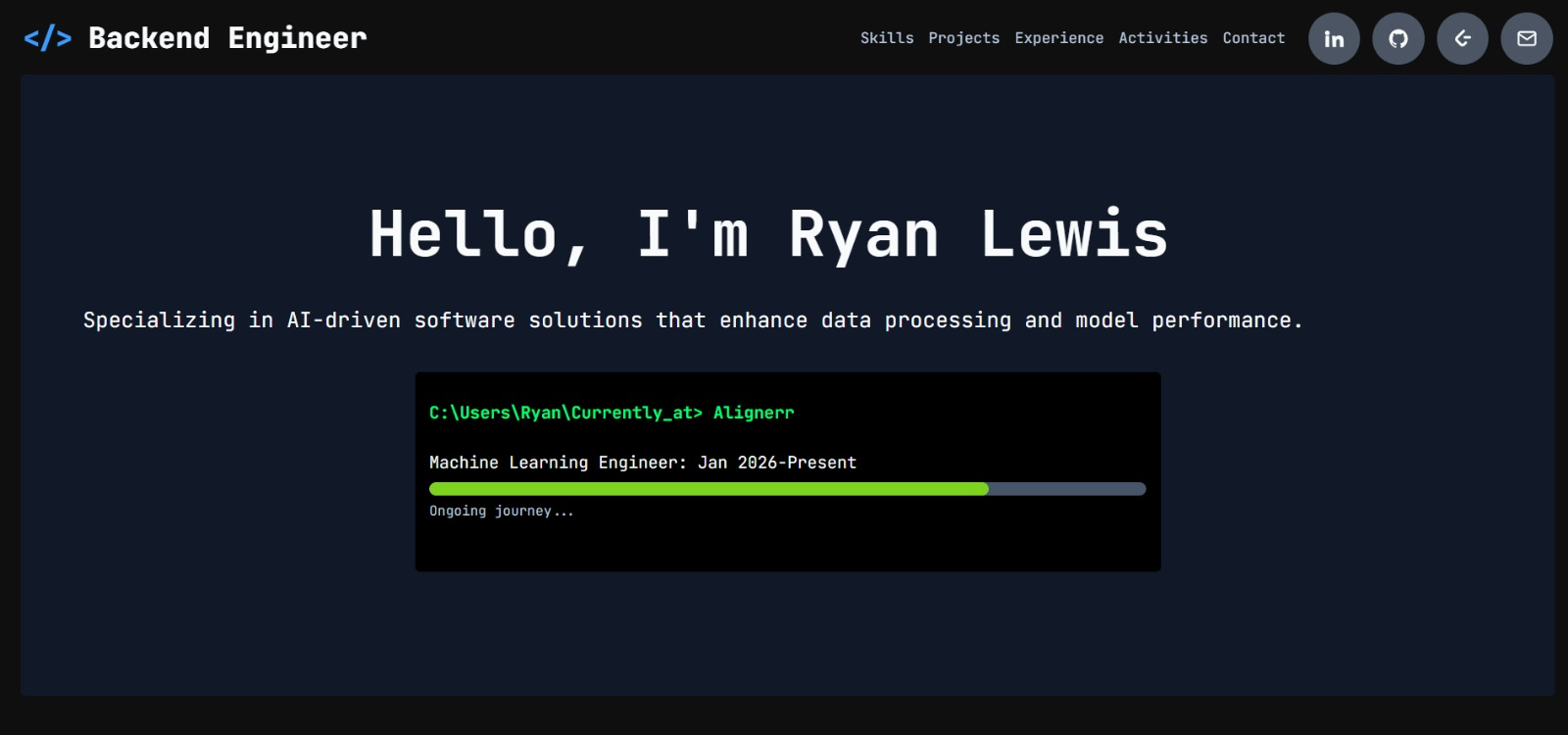
See what your portfolio could look like
This theme is built straight from your resume — pick one and your portfolio is live in minutes.
Was this guide useful?
Be the first to rate it.