TD
TD
Key Takeaways
- A portfolio allows HR and recruiters to showcase the impact of their work through metrics and case studies, making their contributions visible.
- Include hiring metrics, program case studies, sourcing strategies, sample artifacts, and relevant certifications in your portfolio.
- Frame your work by presenting the initial problem, the changes made, and the resulting improvements to demonstrate effectiveness.
- Host your portfolio on a personal site, LinkedIn, or as a shareable PDF, ensuring it aligns with your resume and LinkedIn profile.
- Avoid common mistakes such as listing tasks instead of outcomes and failing to provide before-and-after metrics to illustrate improvements.
HR and recruiting work is judgment-heavy and mostly invisible on a resume. A portfolio lets you show the process behind a hiring metric - how you cut time-to-fill, redesigned onboarding, or built a sourcing pipeline from scratch. Pair this with How to Build a Professional Portfolio and How to Quantify Resume Achievements.
What to Include
| What to include | Why |
|---|---|
| Hiring metrics | time-to-fill, offer-acceptance rate, quality-of-hire, cost-per-hire, before and after a change you made |
| Program case studies | onboarding redesign, DEI initiative, employer branding campaign, performance review overhaul |
| Sourcing and pipeline work | a sanitized example of a search strategy for a hard-to-fill role |
| Sample artifacts | a job description you wrote, an interview scorecard you built, an onboarding checklist (with any confidential details removed) |
| Certifications | SHRM-CP, PHR, or platform certifications (LinkedIn Recruiter, Greenhouse, Workday) |
Frame Programs, Not Just Tasks
A hiring manager scanning your portfolio wants to see: what was broken, what you changed, and what moved. For each case study:
- The starting metric - "Time-to-fill for engineering roles averaged 62 days"
- What you changed - new sourcing channels, revised interview loop, faster feedback SLAs
- The result - "Reduced to 34 days over two quarters while maintaining offer-acceptance rate"
If you cannot share exact company data, use ranges or relative change: "Cut average time-to-fill by roughly 45%."
Where to Host It
- A personal site via the TailorCV portfolio builder - clean and simple to update between roles
- LinkedIn Featured section - link the portfolio and pin a program case study
- A shareable PDF summary for hiring panels who prefer a document
Keep Your Resume and Portfolio in Sync
Your resume, LinkedIn, and portfolio should tell the same story - same specialty (talent acquisition, HRBP, people ops), same headline metrics - just at different levels of depth. Lock the resume down first with the ATS score checker and an ATS-friendly template, then mirror that positioning in your portfolio. See How to Add Your Portfolio Link to Your Resume for placing the link correctly.
Common Mistakes
- Task lists ("posted jobs, screened candidates") instead of outcomes
- Sharing real employee data or unredacted salary bands
- No before/after metric to anchor the improvement
- A portfolio that only covers one program instead of your full scope - see Portfolio Mistakes to Avoid
Pro Tips
- Include one case study about a hire you almost lost and how you saved the offer
- Show your interview scorecard or rubric design - it signals structured thinking
- Generate your portfolio shell from your resume with the portfolio builder and add your program case studies
Effective Showcase Techniques: Use Case Scenarios
One of the best ways to present your portfolio is through real-world examples that illustrate the impact of your work. Here are a few scenarios to consider:
-
The Successful Recruitment Campaign: Detail a recruitment campaign where you improved hiring metrics. Include specifics such as the initial challenges (high turnover rates, long time-to-fill positions) and the strategies you implemented (targeted social media ads, employee referral programs). Conclude with quantifiable results (percentage decrease in turnover, time saved in the hiring process).
-
Diversity Initiatives: Highlight a project focused on enhancing diversity within the workforce. Explain how you identified gaps in diversity, the steps you took to create a more inclusive hiring process (such as bias training for interviewers), and the positive outcomes (increase in diverse hires, improved employee satisfaction ratings).
-
Employee Development Programs: Showcase a training initiative you developed. Discuss the needs assessment you conducted, the training methods you employed (workshops, e-learning modules), and the feedback received from participants. Share metrics such as improvement in employee performance or engagement scores post-training.
Mini Checklist for a Winning HR Portfolio
To ensure your HR portfolio is comprehensive and effective, follow this checklist:
- unchecked: Clear Objective: Define what you want your portfolio to achieve (e.g., demonstrate your impact, attract new clients).
- unchecked: Diverse Content: Include a mix of documents such as case studies, testimonials, and project summaries.
- unchecked: Visual Appeal: Use graphics, charts, and diagrams to illustrate your achievements effectively.
- unchecked: Quantifiable Results: Incorporate metrics to back up your claims (e.g., percentages, dollar amounts, time saved).
- unchecked: Tailored Sections: Customize sections based on the audience you are targeting (e.g., hiring managers vs. HR consultants).
- unchecked: User-Friendly Navigation: Ensure your portfolio is easy to navigate with a clear structure.
- unchecked: Regular Updates: Schedule periodic reviews to add new accomplishments and remove outdated information.
Do’s and Don’ts for Crafting an HR Portfolio
Turning a resume into a portfolio site

You upload the resume you already have and the sections fill themselves in - basics, experience, projects, education - so building the site is editing rather than starting from an empty page.
Do’s
- Do Highlight Collaborative Efforts: Showcase teamwork and collaboration with other departments to underline your ability to work cross-functionally.
- Do Include Testimonials: Feature quotes from colleagues and supervisors that speak to your skills and contributions.
- Do Emphasize Continuous Learning: Display certifications or courses you have completed to show your commitment to professional growth.
Don’ts
- Don’t Overwhelm with Text: Avoid large blocks of text; instead, use bullet points and visuals to make your portfolio engaging.
- Don’t Make It Generic: Tailor your portfolio to reflect your unique experiences and strengths rather than using a one-size-fits-all approach.
- Don’t Neglect Formatting: Ensure consistency in fonts, colors, and layout to maintain a professional appearance throughout your portfolio.
Step-by-Step Guide to Creating Case Studies
Creating effective case studies can significantly enhance your portfolio. Follow these steps:
- Identify the Project: Choose a project that had a significant impact on your organization or client.
- Outline the Challenge: Clearly explain the problem or challenge faced at the beginning of the project.
- Detail Your Approach: Describe the strategies you implemented, including any tools or methodologies used.
- Share Results: Quantify the outcomes with specific metrics, such as improvement percentages or savings achieved.
- Reflect on Learnings: Conclude with insights gained from the experience and how you can apply them in future projects.
Common Pitfalls to Avoid When Building Your HR Portfolio
- Inconsistent Updates: Failing to regularly update your portfolio can lead to a stagnant representation of your skills. Schedule reminders to review and refresh your content.
- Neglecting Audience Needs: Not considering who will view your portfolio can lead to misaligned content. Always tailor your portfolio for the specific audience.
- Lack of Focus: Including too many unrelated experiences can dilute your message. Be selective and focus on the most relevant and impactful work.
- Ignoring Feedback: Not seeking feedback from trusted colleagues can result in missed opportunities for improvement. Regularly ask for constructive criticism on both content and presentation.
By incorporating these practical sections into your HR portfolio, you can create a compelling narrative that effectively showcases your skills and achievements in the field. For more guidance on building your portfolio, check out our Business Analyst Portfolio Guide and How to Build a Portfolio With AI - No Coding Required.
Frequently Asked Questions
Can I show real hiring data?
Only with permission and never with names attached. Anonymize company names, aggregate numbers, or use percentage change instead of raw figures where required.
I am early career with no big programs to show - what do I include?
A well-documented process improvement from an internship, a mock sourcing project for a role you find interesting, or a rubric/template you built. See Build a Portfolio With No Experience.
How do I align my resume?
Use consistent metric framing across both - see How to Quantify Resume Achievements. Additionally, consider using our portfolio builder to create a cohesive presentation of your work. You might also find it useful to explore How to Build a Portfolio With AI for innovative ideas.
Build Your Portfolio Now
You do not need to code a site or spend a weekend on a website builder. Turn your existing resume into a live, shareable portfolio in minutes with the TailorCV portfolio builder - choose a theme, upload your CV, let AI pull in your experience, then layer in your program case studies and publish a link for your resume and LinkedIn. Before you apply, run your resume through the free ATS score checker and switch to an ATS-friendly resume template so your portfolio and resume tell one consistent story.
Related Guides
- How to Build a Professional Portfolio
- How to Quantify Resume Achievements
- Business Analyst Portfolio Guide
- Portfolio Website for Job Applications
- Portfolio Checklist Before Applying
- Portfolio Mistakes to Avoid
- Portfolio About Me Section
- Portfolio Contact Section
- How to Use LinkedIn for Job Search
- AI Portfolio Builder: No Code Required
- Private Portfolio Sharing Guide
- Portfolio With No Experience
Make This Practical
If this topic connects to your work samples, turn the advice into a live proof page with the TailorCV portfolio builder. After publishing, add the link correctly using How to Add Your Portfolio Link to Your Resume, tighten the page with the Portfolio Checklist Before Applying, and make sure recruiters can contact you through a clean Portfolio Contact Section.
Your portfolio works best when it supports the resume, not when it replaces it. Run the resume through the free ATS score checker, choose an ATS-friendly resume template, and use Portfolio SEO: Get Found so your name, role, and strongest programs are easier to discover.
Related Guides to Strengthen This Topic
Use these internal guides to connect this topic with the rest of your job-search workflow:
- How to Build a Professional Portfolio
- Portfolio Website for Job Applications
- Portfolio Checklist Before Applying
- Portfolio Mistakes to Avoid
- How to Write Portfolio Case Study
- Add Portfolio Link to Resume
- Resume Matching With Job Description
- ATS-Friendly Resume Builder
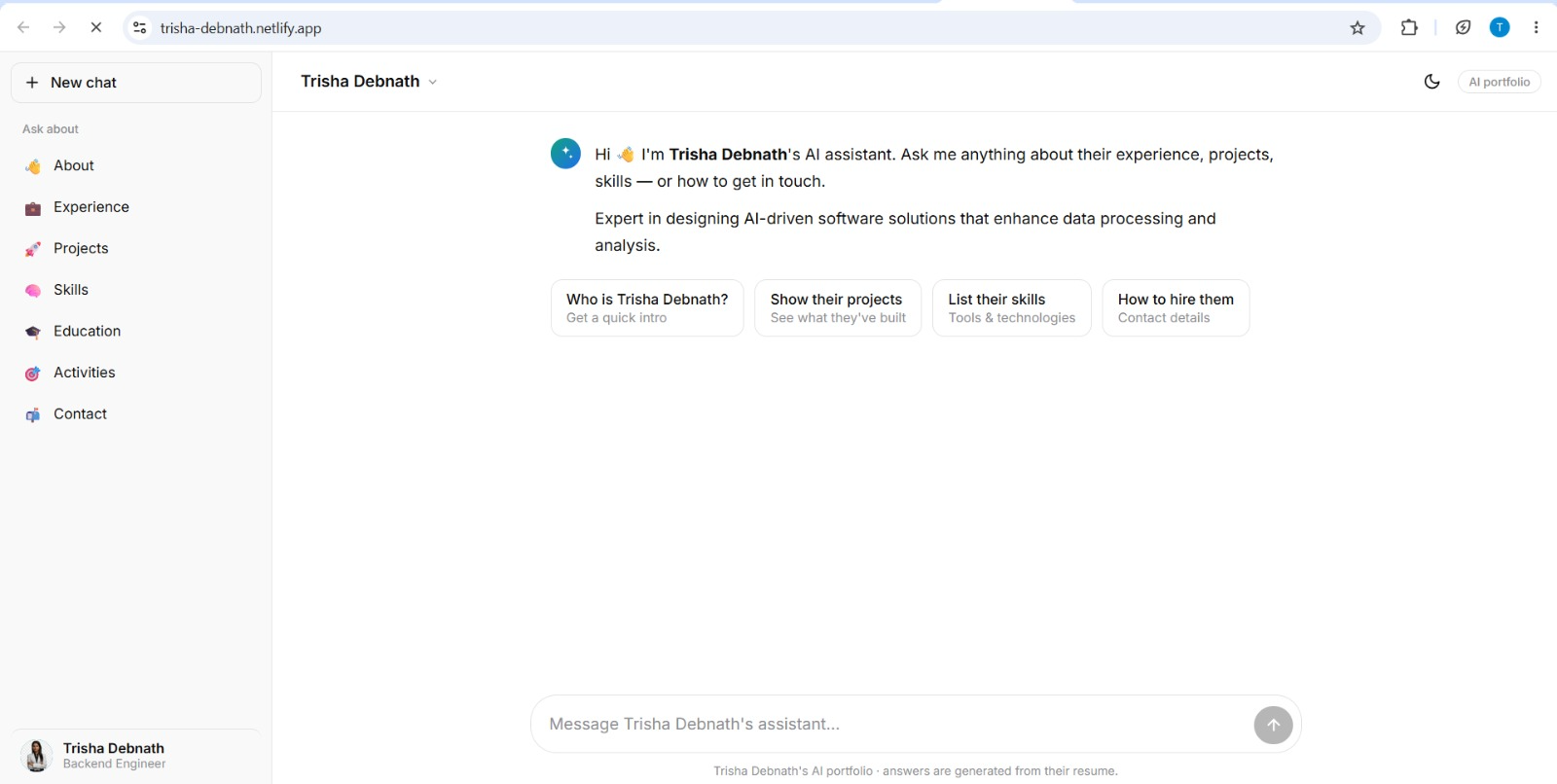
See what your portfolio could look like
This theme is built straight from your resume — pick one and your portfolio is live in minutes.
Was this guide useful?
Be the first to rate it.