SS
SS
Key Takeaways
- The filename is visible in the recruiter's inbox and their system, and it is read before the document.
- Use your name and the document type, optionally with the role.
- Never use version numbers or draft labels, which are the most common and most avoidable mistake.
- PDF unless told otherwise, since it preserves formatting across every system.
- Consistent naming prevents the worst error of sending the wrong file to the wrong employer.
The convention
What to use and why.
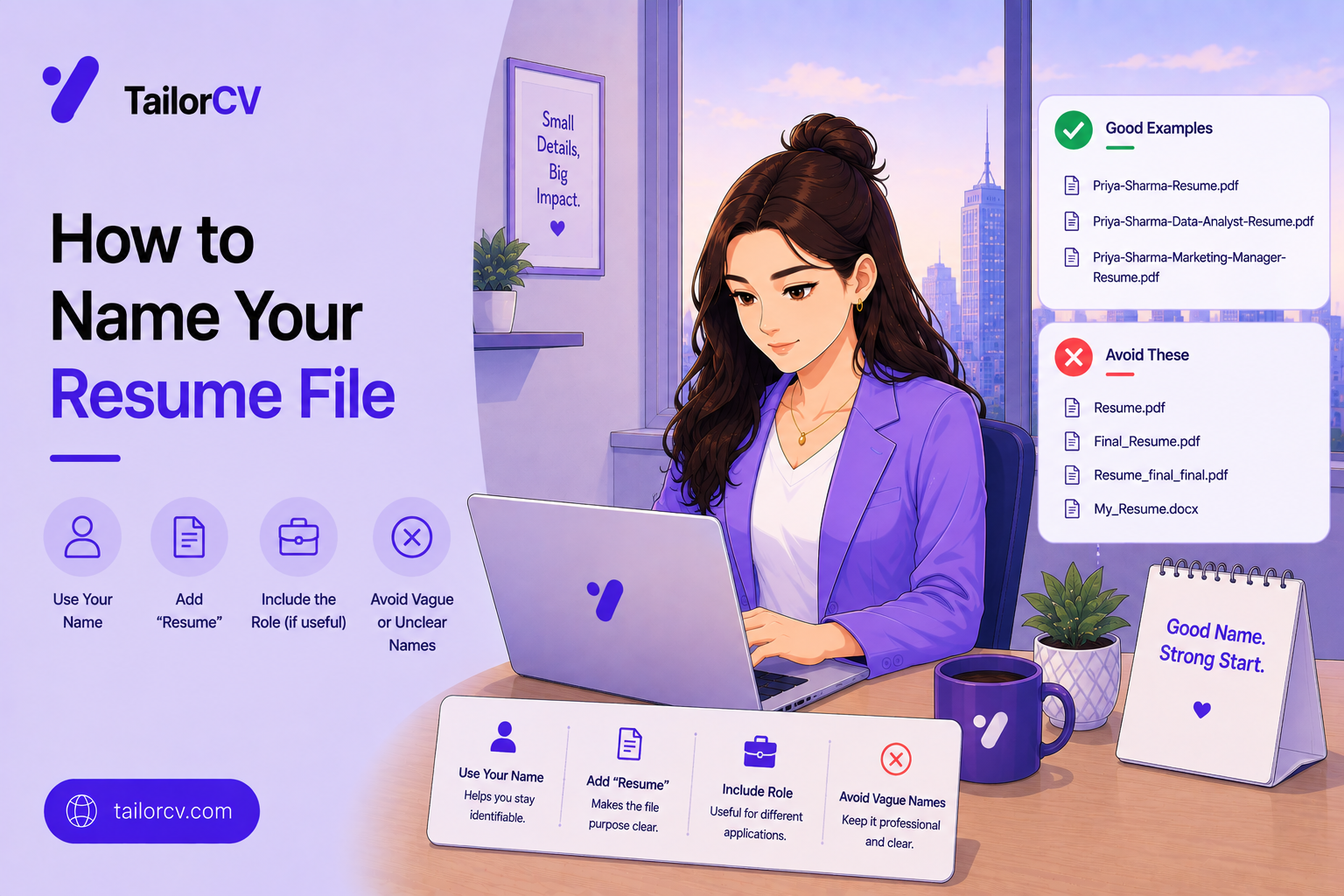
Your full name comes first, because recruiters sort and search by candidate name and a file starting with resume is indistinguishable from forty others in the same folder.
Then the document type — Resume or CV, matching the term used in your market.
Then optionally the role or company, which helps you keep versions straight and demonstrates the application was specific.
Separate with hyphens or underscores rather than spaces, since spaces become awkward encodings in some systems.
Keep it reasonably short. A filename running to fifteen words is its own kind of careless.
Use the extension the employer asked for, and PDF whenever the choice is yours.
A working example is simply your name, then Resume, then the role, which is self-explanatory to anyone who receives it.
What not to do
The names that damage you.
| Filename | What it signals |
|---|---|
| resume-final-v4.pdf | Careless, and reveals your editing history |
| resume.pdf | Indistinguishable from every other file |
| Resume_USE_THIS_ONE.pdf | Disorganised |
| CV-updated-jan-new.docx | Stale and unconsidered |
| John Resume (1).pdf | Downloaded and re-sent without thought |
| untitled.pdf | No attention paid at all |
Version labels are the worst category because they tell the reader you were uncertain and did not tidy up, and they appear more often than any other mistake.
A bare resume.pdf causes practical problems for the recipient, who must rename it to file it, and small frictions accumulate into impressions.
And the trailing (1) from a browser download is a small signal that you did not look at what you were sending.
Why the filename gets seen
The path it travels before anyone opens it.
It arrives in an inbox where a recruiter sees the name alongside dozens of others before deciding what to open first.
It is stored in the applicant tracking system, frequently under the name you gave it, and stays there for years.
It is forwarded internally to hiring managers and interviewers, who see the filename in the message before the attachment.
It appears in the interviewer's downloads folder on the day, and a file called resume-final-v4 is what they are looking at while talking to you.
It is searched for later when someone tries to find your application among hundreds, and a generic name makes that harder.
And it survives longer than the application. Companies retain candidate files, and yours carries whatever name you gave it into every future search.
None of this is decisive on its own. It is simply a free opportunity to look considered, and the cost of getting it wrong is entirely avoidable.
Naming the rest of your application
Consistency across the documents you send.
The cover letter matches the resume, differing only in the document type, so the pair is obviously connected.
Portfolio files follow the same pattern, with your name first and a descriptive label after.
Work samples name the piece rather than describing the file, since a reader needs to know what they are opening.
References documents follow the convention where one is requested separately.
Avoid dates in any of them unless the employer asks, because a date makes a document look stale the moment it ages.
And keep the same convention across a whole search, which makes your own folder navigable and eliminates the risk of an inconsistent set arriving together.
Mini checklist
- unchecked: Full name at the start of the filename
- unchecked: Document type included
- unchecked: Role or company added where useful
- unchecked: No version numbers or draft labels
- unchecked: Hyphens or underscores rather than spaces
- unchecked: Correct extension for what was requested
- unchecked: PDF unless another format was specified
- unchecked: Filename checked immediately before uploading
Scenarios
Scenario 1: You maintain several tailored versions
Name each by role type rather than by number, which makes the folder self-explanatory and removes the risk of sending the wrong one.
Scenario 2: The employer asked for a specific format
Follow it exactly, including any naming convention they specify. Some systems parse filenames, and an application that ignores stated instructions is an easy one to set aside.
Scenario 3: You are sending a resume and a cover letter together
Use matching names differing only in the document type, so the pair is obviously from the same person and stays together when filed.
Tip: Rename the file at the moment you duplicate it, not after editing. The most damaging error in job applications is sending one company a file named for another, and renaming first is what prevents it.
Do's and Don'ts
Do
- Lead with your full name
- Include the document type
- Add the role where it helps
- Use PDF by default
- Match any requested naming convention
- Rename at the point of duplication
Don't
- Use version numbers
- Send a file called resume.pdf
- Leave a download suffix in the name
- Use draft or final in the filename
- Ignore a specified format
- Upload without checking the name
Common Mistakes
- Version numbers. The most common and most visible error.
- Generic filenames. They create work for the recipient.
- Download suffixes. They signal inattention.
- Wrong format. Ignoring instructions is an easy rejection.
- Renaming after editing. Too late to prevent the real error.
- Never checking before upload. The last chance to catch it.
Related Guides
Keep building on this with the related guides in this series:
- Resume Update Checklist Before Applying
- ATS File Format Guide
- Tailoring for Two Similar Roles
- Resume Red Flags Recruiters Notice
- ATS Resume Formatting Mistakes
You can also check your resume's ATS score for free, generate a tailored cover letter, or build a portfolio website in minutes.
Frequently Asked Questions
What should I name my resume file?
Your full name, the document type, and optionally the role — separated by hyphens or underscores. It should be immediately identifiable in a folder of hundreds.
Does the filename actually matter?
Yes. It is visible in the recruiter's inbox and their system before the document is opened, and a careless name is noticed exactly as carelessness.
Should I include the date or a version number?
No. Version numbers and draft labels are the most common filename mistake, and they reveal an editing history nobody needs to see.
PDF or Word?
PDF unless the employer specifies otherwise, since it preserves formatting across systems. Where a format is requested, follow that instruction exactly.
How should I name multiple tailored versions?
By role type rather than by number. A folder where each file names its target role is self-explanatory and prevents sending the wrong version.
When should I rename the file?
At the moment you duplicate it, before editing. This single habit prevents sending one employer a document named for another.
Who actually sees my resume filename?
The recruiter in their inbox, the applicant tracking system that stores it for years, hiring managers it is forwarded to, and the interviewer's downloads folder on the day of your interview.
How should I name my cover letter and portfolio files?
Match the resume convention exactly, differing only in the document type, so the set is obviously connected. Avoid dates, which make documents look stale as they age.
What is your resume scoring right now?
Scan it against a job description and get your ATS match score in about a minute.
Drop your resume here or choose a file
PDF only. Max 2 MB.
We never share your data or use it to train AI models.

Was this guide useful?
Be the first to rate it.