SS
SS

Key Takeaways
- A resume optimizer compares your resume to a specific job description, identifying keyword gaps and match strength, unlike generic resume checkers that provide vague feedback.
- It provides four types of output: keyword gaps, match strength, formatting risks, and bullet-level suggestions for improvement.
- Be cautious of tools that only provide a score without specific feedback or those that give generic advice regardless of the job description.
- Ensure the tool allows you to see actionable recommendations without payment and has a clear privacy policy regarding your resume data.
- A true optimizer requires a job description to assess your resume effectively; without it, the tool is limited to formatting reviews.
A free resume optimizer online helps you compare your resume against a job description and fix the gaps before you apply. That matters because most resumes are not rejected because the candidate is bad. They are rejected because the resume is too generic, missing role keywords, or formatted in a way that screening software reads poorly.
If you want the fastest path, start with the free ATS score checker, then read the resume optimization guide for the full workflow. This post focuses specifically on how to use an optimizer tool well, not on general resume-writing advice you can find elsewhere on this blog.
What a Resume Optimizer Actually Does
A resume optimizer is not the same thing as a generic resume checker. A generic checker usually gives you a single quality score and a handful of stock tips like "use more action verbs" or "keep it to one page." That feedback is not wrong, but it is not specific to any job, and it will not tell you why you are not getting callbacks for a particular role.
What optimizing actually does to your resume
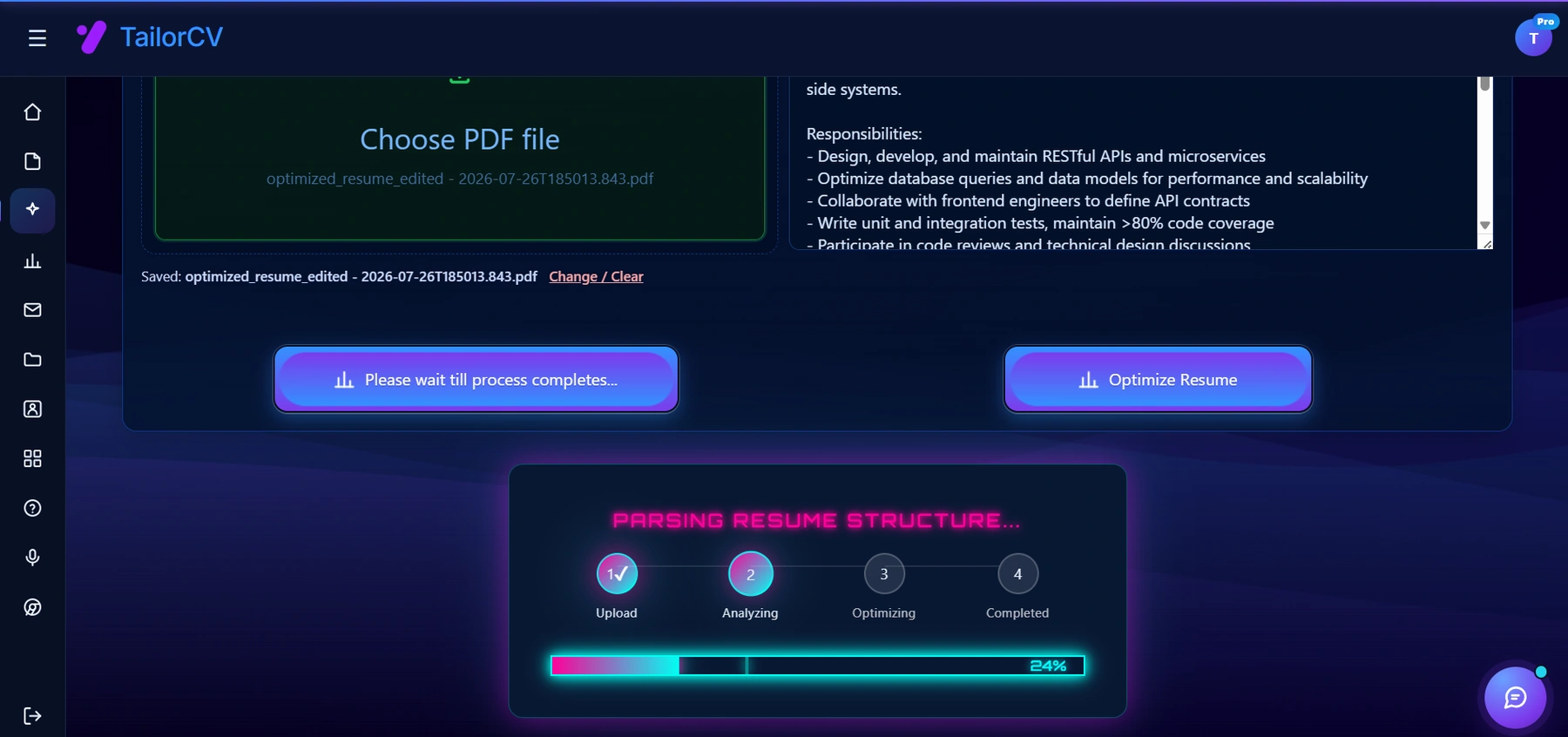
Optimizing runs in four visible stages - upload, analyze, optimize, complete - against the specific job description you paste in. The point of showing the stages is that the tool is parsing your resume the way an ATS would before it rewrites anything.
A real optimizer works differently. It takes two inputs, your resume and a specific job description, and compares them directly. That comparison produces four types of output:
| Type | What it involves |
|---|---|
| Keyword gaps | required or preferred skills, tools, and qualifications from the job posting that do not appear anywhere in your resume |
| Match strength | how closely your existing experience, title history, and skills align with what the posting is actually asking for, not just a vague "quality" score |
| Formatting and parsing risk | whether your resume's layout, file type, headers, or use of tables and columns will cause an ATS to misread your work history or drop sections entirely |
| Bullet-level suggestions | specific lines the tool flags as vague, unmeasured, or missing context, along with a direction for rewriting them |
The difference matters because the first two outputs are relative to a job, and the second two are absolute. A resume can pass every formatting check and still score poorly against a specific posting because it is missing the language that posting uses. Conversely, a resume can be a strong match for a role and still get auto-rejected because a two-column layout confused the parser. A useful optimizer checks both, and tells you which one is the problem.
Free vs. Lead-Gen: How to Tell a Real Tool From a Gimmick
Plenty of sites that call themselves a "free resume optimizer" are really lead-generation funnels. They collect your email and resume, show you an intentionally alarming score, and then gate the actual explanation behind a paid plan. Before you trust the output, run it through a short filter:
- Does it name specific gaps, or just give you a number? A score with no explanation is not feedback. If the tool says "72/100" and nothing else, it has not told you what to fix.
- Are the suggestions tied to the job description you pasted, or generic? If you could paste a completely different job posting and get the same advice back, the tool is not actually reading the posting.
- Can you see the recommendations without paying? It is reasonable for a free tier to limit how many times you can rescan per day. It is a red flag if the score is free but every actionable suggestion is blurred out or locked.
- What happens to your resume data after you upload it? Look for a privacy statement about whether your resume is stored, used to train models, or shared with third parties. If you cannot find one in under a minute, treat that as a signal.
- Does the tool ask for a job description at all? Optimization without a job description is really just formatting review. That is still useful, but it is a different task, and a tool that skips this step cannot claim to measure job match.
None of this means every free tool is a trap. Many are genuinely useful for a first pass, especially for checking parsing and formatting risk, which does not require a job description at all. The free ATS score checker is built around giving you the specific gaps, not just a number, which is the standard worth holding any tool to.
Why Free Tools Are Useful
Free tools are useful when you are applying to many roles and need a quick quality check. Instead of guessing what to change, you can see where your resume is weak before submitting it.
Use a free optimizer when:
- You are applying to a new role type and are not sure your resume translates.
- You copied an old resume for a new application and have not checked whether it still fits.
- You are changing industries and need to know which of your existing skills actually read as relevant.
- You are applying through LinkedIn Easy Apply or a similar high-volume channel and cannot manually tailor every submission.
- You have sent out a batch of applications and are not getting callbacks, and want to rule out a mechanical problem before you rewrite your whole approach. If that describes you, the diagnostic checklist in Does My Resume Pass ATS is a useful companion to run alongside an optimizer.
The Step-by-Step Way to Get Real Value From an Optimizer
Running your resume through a tool once and skimming the score is the least useful way to use one. Here is the sequence that actually produces a better resume.
- Paste the real job description, not just the title. Typing "Product Manager" into a tool gives it almost nothing to compare against. Copy the full posting, including the responsibilities, required qualifications, and preferred qualifications. The job description keyword extraction guide explains why the specific wording of a posting carries more signal than the job title alone.
- Upload the resume version you would actually submit, not a rough draft. Running an optimizer against an outdated or unfinished file wastes the comparison.
- Read every flagged gap individually before touching your resume. Do not batch-edit based on a skim of the report. Each flagged keyword or weak bullet is a separate decision, not a checkbox.
- For every missing keyword, ask one question: do I genuinely have this experience? If yes, find the most honest place to add it. If no, leave it out. An optimizer can tell you a keyword is missing; it cannot tell you whether you are qualified to claim it.
- Rewrite flagged bullets one at a time, checking that the new version is still accurate to what you actually did. See the worked example below for what this looks like in practice.
- Re-run the optimizer after your edits, not just once. Your first round of changes often surfaces a second, smaller round of gaps you could not see before, because early edits shift how the rest of the resume reads.
- Stop when the remaining suggestions require exaggeration, not clarification. If the only way to close a gap is to claim a tool or responsibility you did not have, that gap is not meant to be closed. Leave it.
This loop, paste the real posting, review each flag, verify truthfulness, re-run, is the entire value of using an optimizer. Skipping any one step turns the tool into decoration.
Worked Example: From Flag to Fix
Here is what the process looks like on an actual bullet, not just in the abstract.
Job description snippet: "Looking for a Marketing Coordinator to manage email campaigns end-to-end, using segmentation and A/B testing to improve open and click-through rates, and reporting results to leadership monthly."
Original resume bullet:
Handled email marketing for the company.
An optimizer comparing this bullet against that posting would likely flag it for three separate reasons: no mention of the tools or platform used, no measurable outcome, and none of the specific terms from the posting (segmentation, A/B testing, click-through rate, reporting cadence) appear anywhere in the bullet. That is a useful, specific flag, not a vague "add more detail" note.
Rewritten bullet, assuming the candidate genuinely did this work:
Managed email marketing campaigns end-to-end in HubSpot, using audience segmentation and A/B testing to raise average open rates from 18% to 26% over two quarters, and presented monthly performance reports to the marketing director.
The rewrite works because it addresses the flag directly: it names the platform, includes the two techniques the posting called out by name, states a measurable before-and-after result, and mirrors the reporting cadence language from the posting. Nothing in the rewrite invents an achievement that was not there. It surfaces detail that was missing from the first draft, which is the actual job of the rewrite step, not the job of the tool.
What an Optimizer Cannot Do for You
It is worth being direct about the limits here, because over-trusting a tool is as much of a risk as ignoring it. An optimizer is good at pattern-matching: keyword presence, formatting risk, bullet structure. It is not good at judgment calls that require understanding your actual career.
Specifically, a resume optimizer cannot:
- Tell you whether your career narrative makes sense. It can flag that a bullet is weak, but it cannot tell you that three consecutive job titles read as a lateral drift rather than a progression, or that your most recent role does not logically lead to the job you are applying for.
- Judge whether your achievements are actually impressive relative to your level. A tool can confirm a bullet has a number in it. It cannot tell you that the number is unremarkable for someone at your seniority, or that a more senior reviewer will read it as underwhelming.
- Catch tone problems. Overly passive language, inconsistent voice between sections, or a summary that reads as generic rather than distinctive are things a human reader notices faster than most automated tools do.
- Replace a second pair of eyes. A mentor, former manager, or someone who has hired for the role you want will catch context an algorithm cannot, because they know what "good" looks like for that specific job at that specific company.
Treat an optimizer as the first pass that clears the mechanical problems, keyword gaps, formatting risk, unmeasured bullets, so that a human reviewer's time goes toward the judgment calls a tool cannot make. If you are actively deciding what belongs in your skills section in the first place, pair the optimizer's keyword flags with the skills to add to resume in 2026 guide, since a tool will only ever surface skills relative to the one job description you pasted in.
What Not to Do
Do not paste the entire job description into your resume. Do not hide keywords in white text or in a font size of one pixel. Do not claim tools or responsibilities you cannot discuss in detail in an interview. Recruiters and hiring managers may not catch the first two mistakes on a first read, but keyword stuffing reads as generic rather than targeted, and both mistakes destroy trust the moment they are discovered, whether that is during a resume screen or three questions into an interview.
A related mistake is treating one optimized resume as a permanent, one-size-fits-all document. Even similar-sounding roles at different companies use different required tools, different seniority signals, and different priority language. Running the optimizer once and reusing that output for every application defeats the purpose. The common resume and job description mismatch mistakes post covers the specific ways this shows up in practice.
Free vs. Paid Tiers: What's Reasonable to Expect
Most tools in this category, resume optimizers, ATS checkers, keyword matchers, follow a similar shape between their free and paid tiers, even though the exact features vary by provider. Knowing the general pattern helps you judge whether a specific tool's free tier is generous or stingy.
Reasonable to expect for free:
- A match score or summary comparing your resume to a job description you provide.
- A list of missing or weak keywords relative to that job description.
- Basic formatting and parsing risk flags, such as unsupported file types, missing standard section headers, or layout elements that commonly break ATS parsing.
- At least a limited number of scans per day or per resume, even if unlimited use is paywalled.
Commonly gated behind a paid tier:
- Unlimited rescans, useful if you are applying to a high volume of roles and iterating frequently.
- Bulk or side-by-side comparison across multiple job descriptions at once.
- Full AI-generated rewrites of every bullet rather than flags plus manual rewriting.
- Export formats, additional templates, or integration with a cover letter or application tracker.
None of this is a criticism of charging for advanced features, tools have real costs to run. The point is calibration: if a tool's free tier will not even tell you what is wrong, only that something is wrong, you are looking at a lead-generation page, not an optimizer. A free tier that gives you specific, actionable gaps and gates convenience features like unlimited scans or bulk rewrites is a normal, sustainable model.
Make This Practical
Do not guess whether the resume is ready. Upload it to the free ATS score checker, compare the result with the ATS Score Guide, and fix formatting issues using ATS Resume Formatting Mistakes and ATS Resume Parser Friendly Format.
After the technical cleanup, improve relevance. Use Resume Matching With Job Description, strengthen keyword coverage with the Resume Keywords Guide, and avoid overdoing it by checking ATS Keyword Mistakes. If the layout itself is weak, rebuild with an ATS-friendly resume template.
Once the resume itself is in good shape, close the loop on the rest of the application. Generate a matching draft with the AI cover letter generator, and if the role is competitive, run a practice session with the AI mock interview tool so you can speak confidently about every bullet the optimizer helped you strengthen. If you are unsure whether your free scan results are trustworthy in the first place, the comparison in Best Free ATS Resume Checkers Compared is a useful reference before you commit time to any one tool.
FAQ
Is a free resume optimizer enough?
It is enough for a first pass. For competitive roles, you should also manually review your strongest bullets and practice interview answers based on the rewritten resume, since a tool cannot judge how impressive your achievements read relative to your level.
Can AI optimize my resume safely?
Yes, if you review the output and keep every claim truthful. Use AI for clarity and alignment, not exaggeration, and treat every suggested keyword as a prompt to check your own experience, not an instruction to add it regardless.
Should I optimize for every job I apply to?
Yes, at least lightly, since even similar-sounding roles use different keywords, tools, and priority language. A five-minute rescan against the actual posting catches most of the gap; see How to Match Resume to Job Description Fast for a quicker version of the workflow when you are applying at volume.
Do I need a job description to get useful feedback?
For keyword and match scoring, yes, a title alone is not enough signal. Without a job description, an optimizer can still check formatting and parsing risk, which is useful, but it is a narrower check than a full match comparison.
How is an optimizer different from a plain ATS score checker?
An ATS score checker mostly answers whether your resume will parse correctly. An optimizer goes further and compares your resume's content against a specific job description to flag missing keywords and weak bullets. The ATS Resume Checker: How It Works post breaks down that distinction in more detail.
What should I do if my score barely changes after editing?
If your score is still low after a first rewrite, the problem is usually keyword alignment or targeting rather than writing quality. Recheck which required skills from the posting are still missing, and confirm you are not accidentally applying a resume tailored for a different role. The ATS Score Guide for 2026 explains what the score is actually measuring, which helps you diagnose this faster.
Is it safe to upload my resume to a free online tool?
Check the tool's privacy statement before uploading, specifically whether your data is stored, reused, or shared with third parties. If you cannot find that information quickly, or the tool has no privacy statement at all, treat that as a reason to be cautious.
How often should I rescan while editing?
Rescan after each meaningful round of edits, not after every single bullet change. Early edits often shift how later sections read, so a second pass frequently surfaces smaller gaps you could not see on the first scan; see the step-by-step section above for the full loop.
Next Step
Check your resume against a real job description with the free ATS score checker before you submit your next application.
What is your resume scoring right now?
Scan it against a job description and get your ATS match score in about a minute.
Drop your resume here or choose a file
PDF only. Max 2 MB.
We never share your data or use it to train AI models.

Templates that keep this structure intact
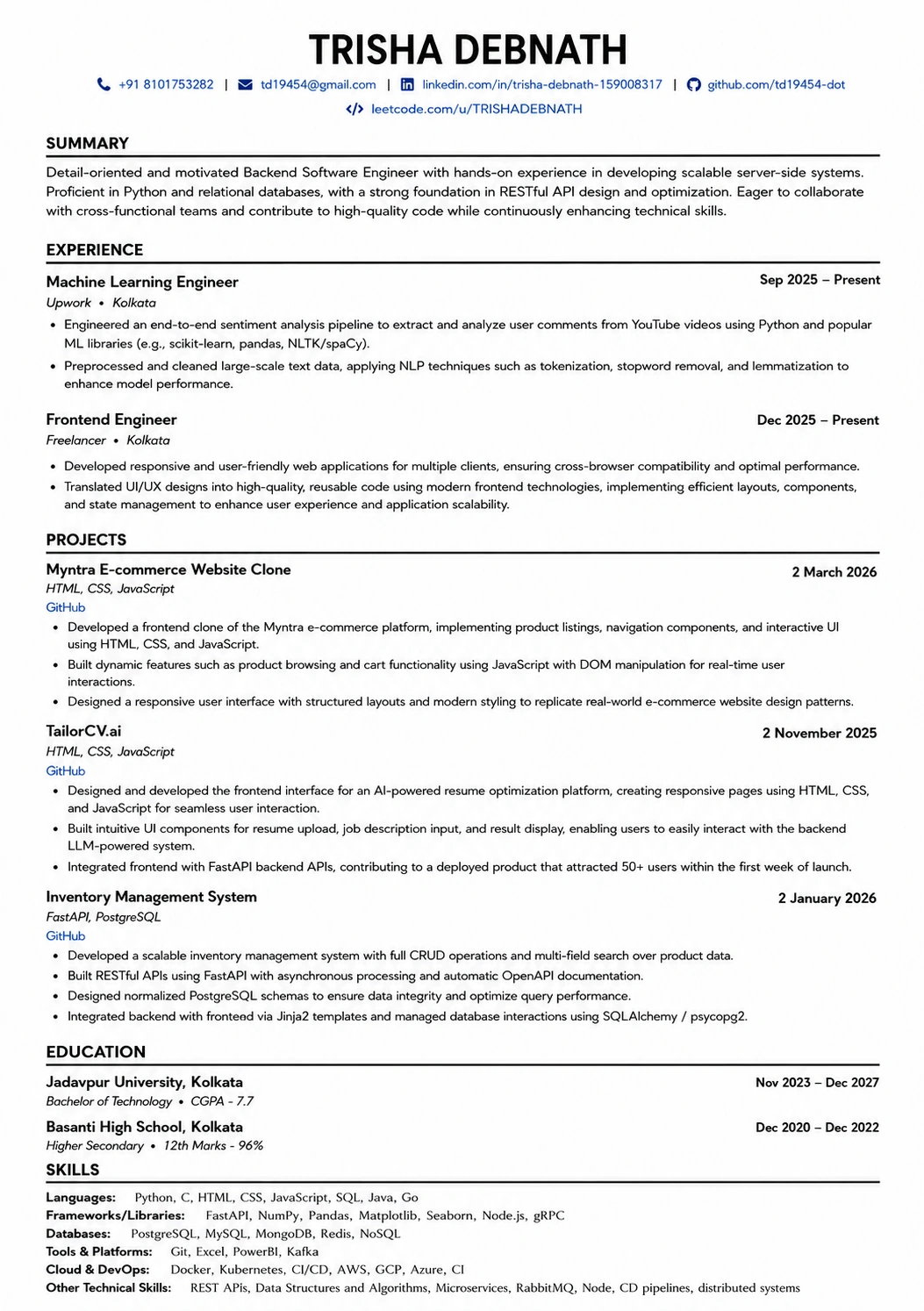
This template is ATS-tested — start from it and the formatting rules in this guide are already handled.
Was this guide useful?
Be the first to rate it.